> For the complete documentation index, see [llms.txt](https://uni.fotello.co/llms.txt). Markdown versions of documentation pages are available by appending `.md` to page URLs; this page is available as [Markdown](https://uni.fotello.co/other-assets/property-info.md).
# Property Info
Property info is what makes your property website feel complete. The more you add, the more useful it is for buyers.
If your customer books using your Fotello order form, key fields like address and area can auto-populate. For everything else, follow the steps below to customize it.
### Add property info
{% stepper %}
{% step %}
#### Open the Info tab
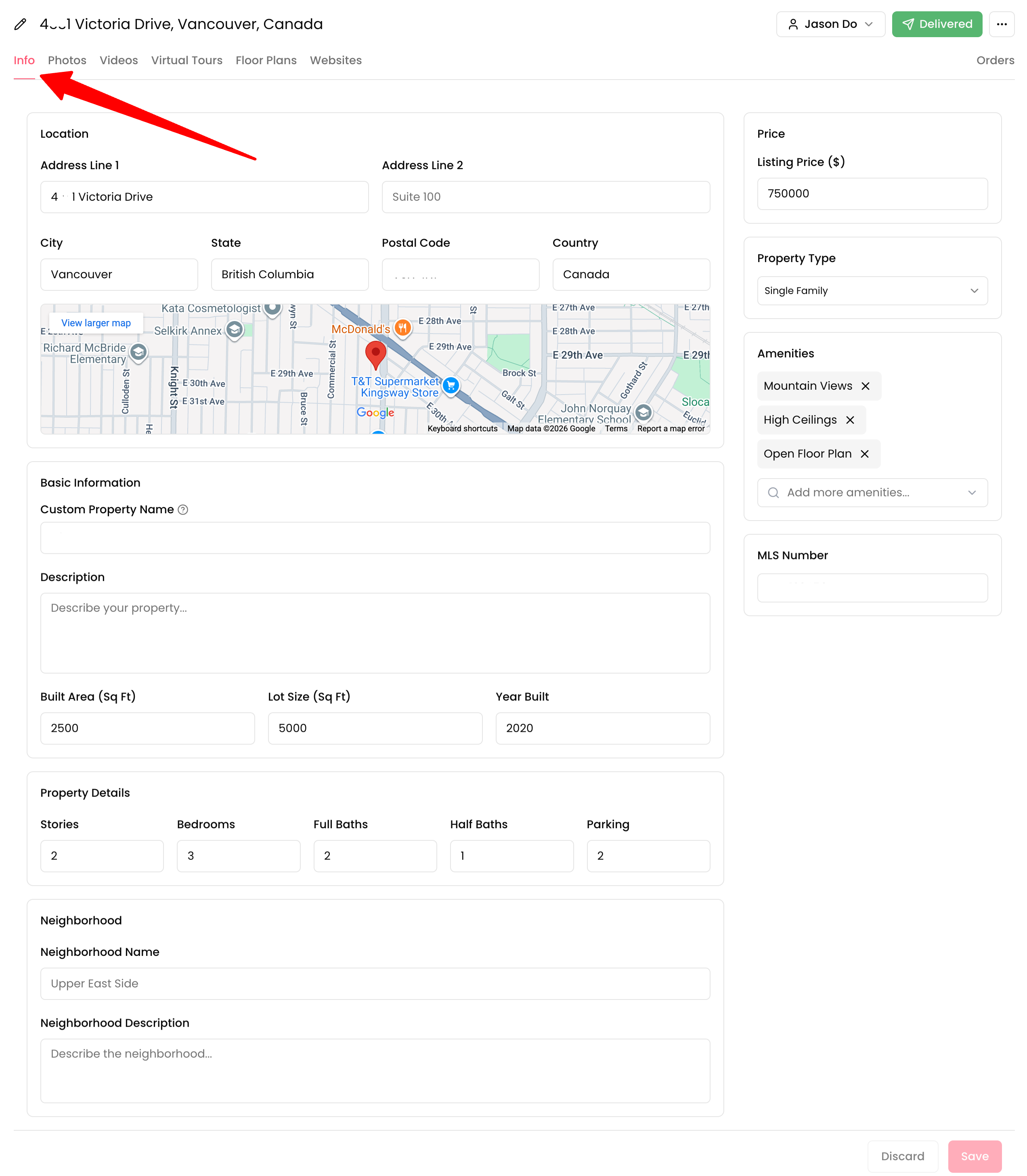
Open the listing, then click **Info tab**.
{% endstep %}
{% step %}
#### Confirm the location
Check the address fields and map pin. Fix typos so the map lands correctly.
{% endstep %}
{% step %}
#### Add an address not in search
If the address is not available in search, scroll to **Custom Property Name**.
Enter the property name or address you want to use, then save your changes.
{% endstep %}
{% step %}
#### Fill in the property details
Add the details your customers and buyers expect to see:
* Custom Property Name (optional headline)
* Description (the “story” of the home)
* Built Area, Lot Size, Year Built
* Stories, Bedrooms, Full Baths, Half Baths, Parking
* Listing Price and Property Type
* Amenities (add multiple tags that buyers search for)
* MLS Number
* Neighborhood name and Neighborhood description (add notes that sell the lifestyle)
{% endstep %}
{% step %}
#### Save
Click **Save**. Your property website templates automatically update from this info.
{% hint style="info" %}
If you change the **address** and the order already has an open invoice, Fotello asks whether to void that invoice and create a new one with the updated address. See [Order Invoices](/payments/order-invoices.md).
{% endhint %}
{% endstep %}
{% endstepper %}
### Best practices
* Keep the description clean and short.
* Lead with the top 2–3 selling points.
* Add amenities like “Mountain Views” or “Open Floor Plan”.
* Include MLS number when the listing has one.
* Add neighborhood context buyers can’t see in photos.
> Once all the assets have been added, see [Deliver listing](/delivering-listings/deliver-listing.md) to send your customers an all-in-one link.
---
# Agent Instructions
This documentation is published with GitBook. GitBook is the documentation platform designed so that both humans and AI agents can read, navigate, and reason over technical content effectively. Learn more at gitbook.com.
## Querying This Documentation
If you need additional information that is not directly available in this page, you can query the documentation by asking a question.
Perform an HTTP GET request on the following URL with the `ask` and `goal` query parameters:
```
GET https://uni.fotello.co/other-assets/property-info.md?ask=&goal=
```
`ask` is the immediate question: it should be specific, self-contained, and written in natural language.
`goal` is what the user is ultimately trying to achieve, the reason they need the answer. Sharing it helps GitBook give you a better, more relevant answer. A goal is most helpful when it describes the outcome the user wants rather than restating the question. For example, with `ask=how do I create an API token`, a goal like `automate deployments from our CI pipeline` lets GitBook tailor the answer to that use case.
The response will contain a direct answer to the question and relevant excerpts and sources from the documentation.
Use this mechanism when the answer is not explicitly present in the current page, you need clarification or additional context, or you want to retrieve related documentation sections.