> For the complete documentation index, see [llms.txt](https://uni.fotello.co/llms.txt). Markdown versions of documentation pages are available by appending `.md` to page URLs; this page is available as [Markdown](https://uni.fotello.co/other-assets/property-websites.md).
# Property Websites
Give every listing a distraction-free website with branded and MLS-ready links. Most real estate media companies and agents pay to create and host a single-property website. Fotello automatically takes your assets and turns them into a beautiful, professional website for FREE!
### Why customers love them
* **Focus:** buyers stay on the home you’re marketing.
* **More engagement:** people scroll, watch, and explore for longer.
* **Easy sharing:** one link works in text, email, socials, and YouTube.
* **Better recall:** fewer clicks means fewer drop-offs.
### What you get in Fotello
* **7 ready-to-go templates**
* **Auto-populated pages** from your listing’s **Info**, photos, and asset tabs
* **Branded + unbranded links** for every template (see below for differences)
### Premium templates
Premium property websites include premium templates with a more elevated visual style.
Each premium template uses distinct font choices and text placement. Choose the design that best fits the listing's presentation.
#### Aura, with background music
**Aura** is our newest premium design. It opens on a full-width hero that cycles through your best five photos, then moves through the description, property details, gallery, video, virtual tour, floor plan and map as a single scroll.
Aura is also the first template that plays **background music**. A soft instrumental track starts with the site and sets the mood while buyers scroll.
* In the **Websites** tab, Aura is marked **New**, and a speaker icon on its preview tells you the design includes music.
* Anyone viewing the website can turn the music off or back on with the speaker button in the corner of the page.
### Create a property website in minutes
{% stepper %}
{% step %}
**Add your property info**
Provide comprehensive listing details in the **Info** tab. Adding more information enhances the appearance and value of your website.
See: [Property Info](/other-assets/property-info.md)
{% endstep %}
{% step %}
**Add the rest of the listing assets**
Drop in the assets you want buyers to see and download like [Videos](/other-assets/other-videos.md), [Virtual Tours](/other-assets/virtual-tours.md) and [Floor Plans](/other-assets/floor-plans.md).
Before you publish the website, make sure your **Photos** tab is final:
* Reorder or hide shots to match your preferred flow
* Import any externally edited photos (if you edited outside Fotello)
{% endstep %}
{% step %}
**Pick a template and copy the link**
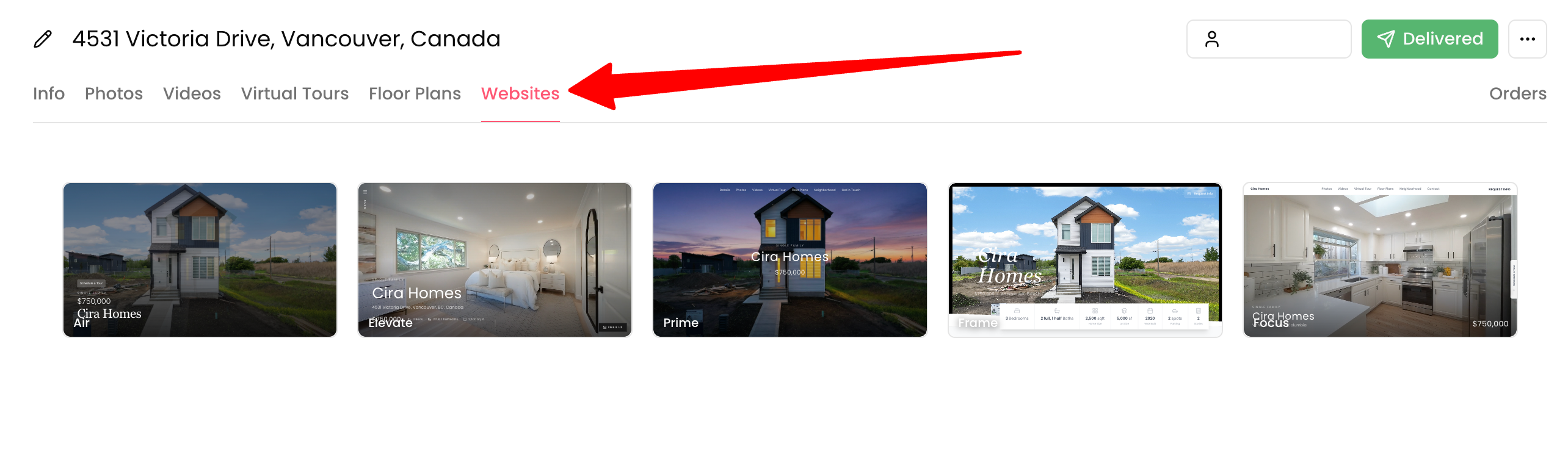
Open the **Websites** tab. Your designs are organized into two sections:
* **Active website** - the template currently set for this listing.
* **Other templates/Premium templates** - every other design you can switch to. Premium designs show a lock icon until they're included in your plan.
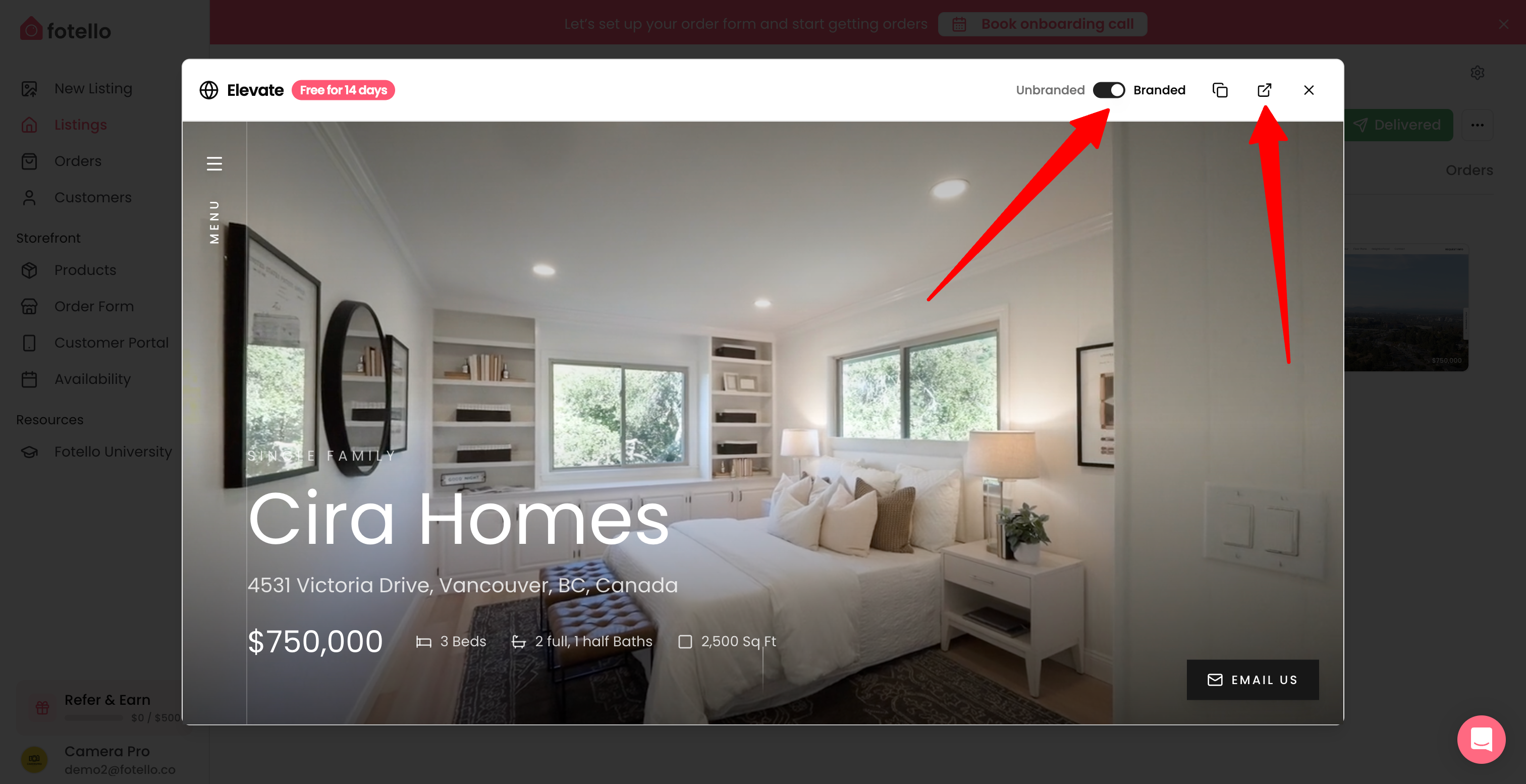
You can toggle between the **Branded** or **Unbranded** versions from the top right and clicking to open the link in a new tab.
{% endstep %}
{% step %}
**Deliver everything with one click**
When you’re ready, send your customer a single delivery link with both the branded and unbranded versions. You can choose which property website to include in the email.
See: [Deliver listing](/delivering-listings/deliver-listing.md)
{% endstep %}
{% step %}
**Make it fully white-labeled (optional)**
Add your brand basics once in [Branding](/business-details/branding.md).
If you want your links on your own domain, connect it in [Domain](/business-details/domain.md).
{% hint style="warning" %}
Custom domains require an Ultimate plan.
{% endhint %}
{% endstep %}
{% endstepper %}
### Branded vs unbranded links
{% tabs fullWidth="true" %}
{% tab title="Branded (marketing)" %}
Use this link anywhere you want your brand to be visible - think social posts, email campaigns, and realtor websites.
Branded websites can show:
* Property headline and key info
* Links to listing assets
* Realtor name, logo, profile photo and contact details
* Realtor license number (for example, a DRE#)
This link works best for:
* Luxury/ultra-luxury homes
* Design-led, architecturally distinct properties
* Off-market or soft-launch listings
* Developer showcases or marquee assets
{% hint style="info" %}
Customer information updates seamlessly on branded property websites, enabling direct and effortless contact. With richer details, the site becomes more personalized, creating a smoother, more engaging experience for the website audience. Add customer details in [Customers](/customers/customers.md#update-customer-details).
{% endhint %}
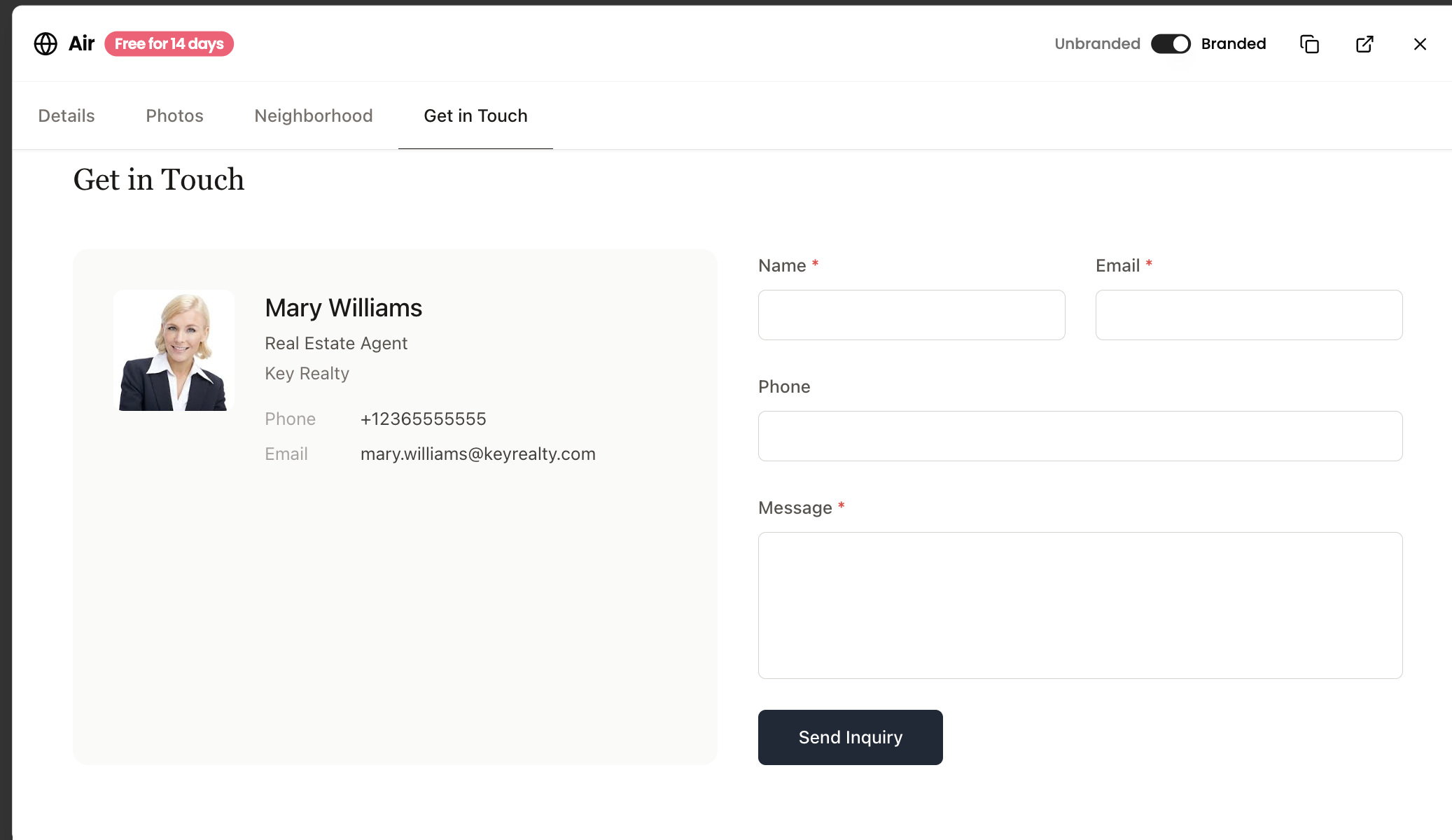
This is how your customer's information will look in branded property websites, making enquiries simple and seamless:
If you've added a **License Number** to the customer's details, it appears alongside their phone and email in the contact section.
{% hint style="info" %}
Add a customer's license number in their details. See [Customers](/customers/customers.md#update-customer-details).
{% endhint %}
{% endtab %}
{% tab title="Unbranded (MLS)" %}
Use this link when uploading to MLS as most providers do not allow any branding or agent information in virtual tours or property websites.
Unbranded websites include:
* Property headline and key info
* Links to listing assets
* **No** agent name, contact info, photo, or branding
This is best for:
* Entry to mid-market properties
* High-demand, fast-moving inventory
* Price-sensitive buyers
* 'It will sell anyway' listings
{% endtab %}
{% endtabs %}
---
# Agent Instructions
This documentation is published with GitBook. GitBook is the documentation platform designed so that both humans and AI agents can read, navigate, and reason over technical content effectively. Learn more at gitbook.com.
## Querying This Documentation
If you need additional information that is not directly available in this page, you can query the documentation by asking a question.
Perform an HTTP GET request on the following URL with the `ask` and `goal` query parameters:
```
GET https://uni.fotello.co/other-assets/property-websites.md?ask=&goal=
```
`ask` is the immediate question: it should be specific, self-contained, and written in natural language.
`goal` is what the user is ultimately trying to achieve, the reason they need the answer. Sharing it helps GitBook give you a better, more relevant answer. A goal is most helpful when it describes the outcome the user wants rather than restating the question. For example, with `ask=how do I create an API token`, a goal like `automate deployments from our CI pipeline` lets GitBook tailor the answer to that use case.
The response will contain a direct answer to the question and relevant excerpts and sources from the documentation.
Use this mechanism when the answer is not explicitly present in the current page, you need clarification or additional context, or you want to retrieve related documentation sections.

 to open the link in a new tab.