> For the complete documentation index, see [llms.txt](https://uni.fotello.co/llms.txt). Markdown versions of documentation pages are available by appending `.md` to page URLs; this page is available as [Markdown](https://uni.fotello.co/photos/editing/enhancing.md).
# Enhancing
Once you are happy with the bracketing and preferences, review the selected photos.
To exclude a photo before enhancement, uncheck it. Fotello will not enhance that photo.
Then click the pink **Enhance Listing** button at the bottom.
The moment you hit **Enhance**, Fotello starts uploading right away. We process files as they arrive. Once a photo is in, we process it in about **2 minutes**, no matter how many photos you uploaded.
{% hint style="info" %}
When you click the "Enhance Listing" button in Fotello, you are charged for the listing at this stage. This action finalizes the listing with your selected photos, and Fotello begins uploading and processing them as a group.
{% endhint %}
### Upload speed
We don’t throttle uploads. Your upload speed depends on your internet connection, the size and number of photos you're trying to upload. For most users, uploads feel faster than Dropbox, especially with large batches of RAW images.
### Upload progress
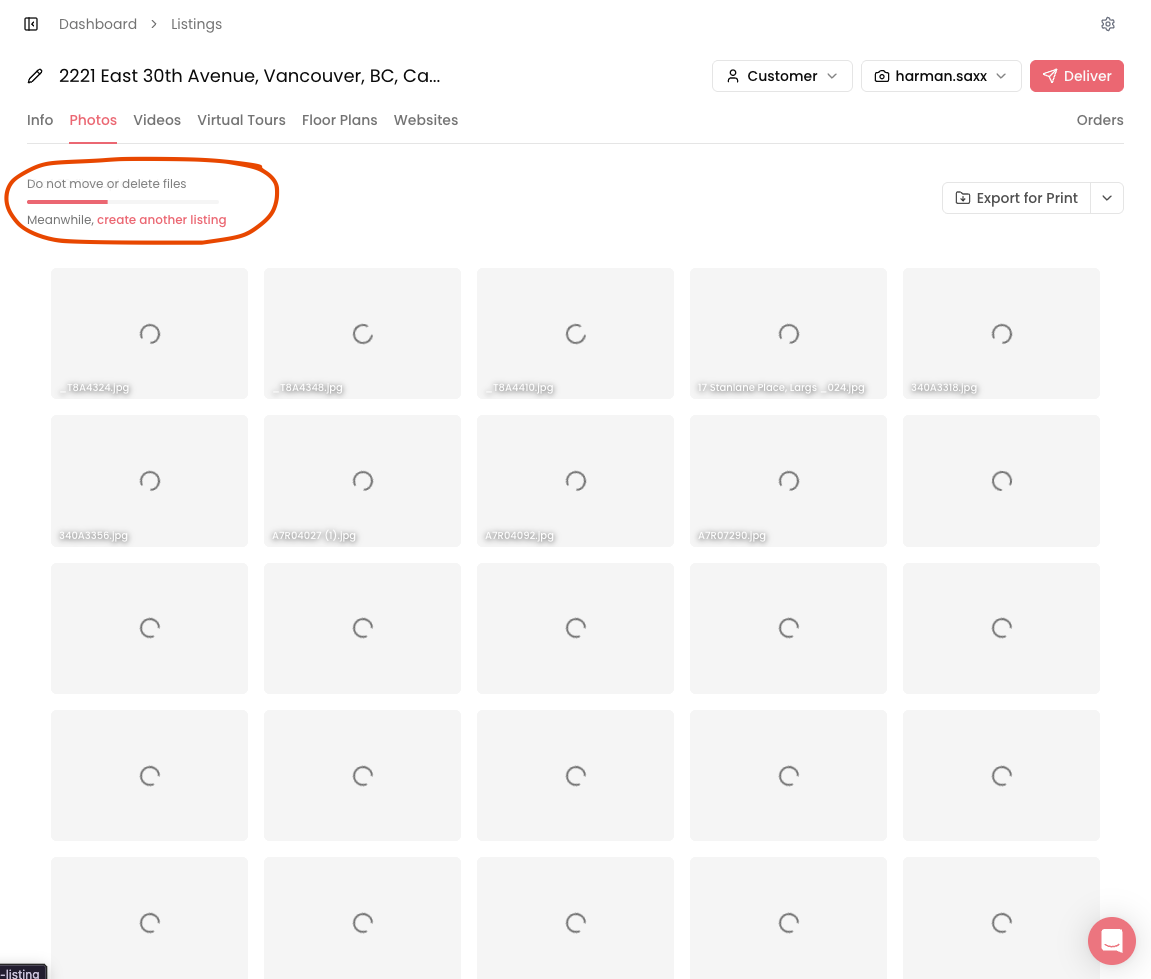
Track your upload from the progress bar in the top-left of the listing. If something fails, click **Retry** below the progress bar to continue the upload.
See more: [Upload Failure](/troubleshooting/upload-failure.md#if-upload-fails)
{% hint style="info" %}
**Pro tip:** You don’t need to watch the upload.
Open **New Listing** in a new tab and start uploading the next listing. Fotello can process multiple listings at the same time!
{% endhint %}
### Best practices
These are the small things that prevent failed uploads.
* **Don’t move or delete files while they upload.** Keep them in the same folder until you’re done.
* **Don’t refresh the browser tab.** A refresh stops the upload.
* **Keep your computer awake.** Disable sleep mode until the upload completes.
* **Use stable internet.** Wi‑Fi dropouts can interrupt large batches.
* **Watch your RAM.** Heavy apps + big uploads can crash the browser.
{% hint style="warning" %}
**Upload failed or missing photos**
Fotello will process whatever successfully made it in. For the rest, use **Re-upload failed files**.
See more: [Upload Failure](/troubleshooting/upload-failure.md)
{% endhint %}
---
# Agent Instructions
This documentation is published with GitBook. GitBook is the documentation platform designed so that both humans and AI agents can read, navigate, and reason over technical content effectively. Learn more at gitbook.com.
## Querying This Documentation
If you need additional information that is not directly available in this page, you can query the documentation by asking a question.
Perform an HTTP GET request on the following URL with the `ask` and `goal` query parameters:
```
GET https://uni.fotello.co/photos/editing/enhancing.md?ask=&goal=
```
`ask` is the immediate question: it should be specific, self-contained, and written in natural language.
`goal` is what the user is ultimately trying to achieve, the reason they need the answer. Sharing it helps GitBook give you a better, more relevant answer. A goal is most helpful when it describes the outcome the user wants rather than restating the question. For example, with `ask=how do I create an API token`, a goal like `automate deployments from our CI pipeline` lets GitBook tailor the answer to that use case.
The response will contain a direct answer to the question and relevant excerpts and sources from the documentation.
Use this mechanism when the answer is not explicitly present in the current page, you need clarification or additional context, or you want to retrieve related documentation sections.