> For the complete documentation index, see [llms.txt](https://uni.fotello.co/llms.txt). Markdown versions of documentation pages are available by appending `.md` to page URLs; this page is available as [Markdown](https://uni.fotello.co/products/travel-fee.md).
# Travel Fee
Add a travel fee to cover the cost of getting to appointments that are further away. The fee is based on the distance or drive time between the assigned team member's home base and the appointment location.
Travel fees are calculated when an invoice is created and show up as a separate line item on the invoice.
### Why use travel fees
* **Cover travel costs** without raising your base service prices.
* **Keep pricing fair** so nearby customers aren't subsidizing faraway ones.
* **Flexible tiers** let you offer a free zone close to home and only charge past a certain distance or drive time.
* **Per-member calculation** means each team member's fee is based on their own home base, not a single company address.
### How it works
1. You set up a travel fee with tiers based on **distance** (miles or km) or **drive time** (minutes).
2. Each team member sets a **home base** address. If they don't, the company address is used.
3. When an order is accepted and an invoice is created, Fotello calculates the driving distance or time from the assigned member's home base to the appointment address.
4. The travel fee shows up as a line item on the invoice and is included in the total.
{% hint style="info" %}
Travel fees use actual driving routes, not straight-line distance.
{% endhint %}
### Set up travel fee
{% stepper %}
{% step %}
**Open Travel Fee**
Go to **Studio Manager → Products → Travel Fee** or use [this link](https://app.fotello.co/dashboard/products/travel-fee).
{% endstep %}
{% step %}
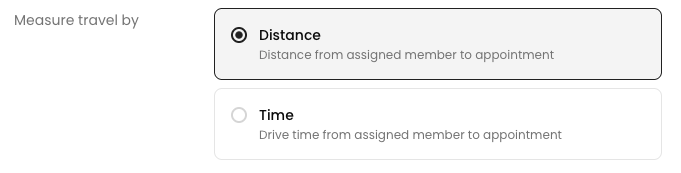
**Choose a travel metric**
Pick how you want to measure travel:
* **Distance**: from the assigned member's home base to the appointment, in miles or kilometers (based on your business settings).
* **Time**: drive time from the assigned member's home base to the appointment, in minutes.
{% endstep %}
{% step %}
**Configure fee tiers**
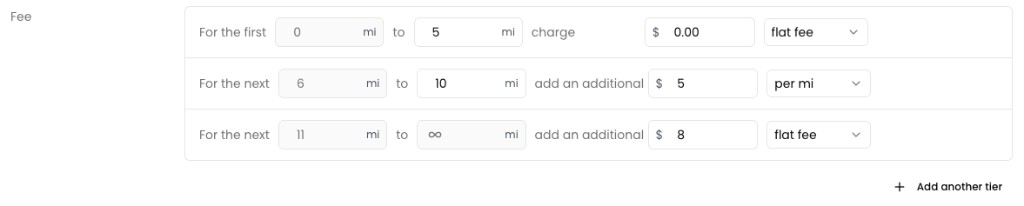
Set up one or more tiers. Each tier covers a range of distance or time and has its own charge.
For each tier, set:
* **Range**: the min and max values. The last tier has no upper limit.
* **Amount**: the dollar amount to charge.
* **Fee type**: choose **flat fee** (a fixed amount for the range) or **per mile / per km / per minute** (amount multiplied by units in that range).
Click **Add another tier** to add more.
{% hint style="info" %}
The first tier always starts at 0. Set the amount to $0.00 to create a free travel zone.
{% endhint %}
{% endstep %}
{% step %}
**Test with the fee calculator**
Use the fee calculator at the bottom to preview what a customer would pay for a given distance or time.
{% endstep %}
{% step %}
**Save**
Click **Save** to apply your settings. The fee will be calculated on all new invoices going forward.
{% endstep %}
{% endstepper %}
### Set up home base
Each team member's travel fee is measured from their **home base** address. If a member doesn't have one set, the company address is used.
{% stepper %}
{% step %}
**Open Home Base**
Go to **Studio Manager → Availability → Home Base** or use [this link](https://app.fotello.co/dashboard/availability/home-base).
{% endstep %}
{% step %}
**Select a team member**
If you're an owner or admin, use the member selector in the top right to pick whose home base to set.
{% endstep %}
{% step %}
**Set the address**
Search for the address and select it from the suggestions.
{% endstep %}
{% step %}
**Save**
Click **Save** to update. Use **Reset to Default** to go back to the company address.
{% endstep %}
{% endstepper %}
### Example setups
#### Free zone + per-mile charge
| Tier | Range | Fee |
| ---- | ------- | -------------- |
| 1 | 0–15 mi | $0.00 flat fee |
| 2 | 16 mi+ | $1.50 per mile |
Appointments within 15 miles are free. Past that, the customer pays $1.50 for each additional mile. A 25-mile appointment would cost $15.00 in travel fees (10 miles x $1.50).
#### Tiered flat fees
| Tier | Range | Fee |
| ---- | -------- | --------------- |
| 1 | 0–10 mi | $0.00 flat fee |
| 2 | 11–25 mi | $25.00 flat fee |
| 3 | 26 mi+ | $50.00 flat fee |
Fixed charges that go up with distance. Simple and predictable for customers.
#### Drive-time based
| Tier | Range | Fee |
| ---- | --------- | ---------------- |
| 1 | 0–30 mins | $0.00 flat fee |
| 2 | 31 mins+ | $1.00 per minute |
Useful when distance doesn't reflect actual travel time because of traffic or road conditions.
### How travel fee appears on invoices
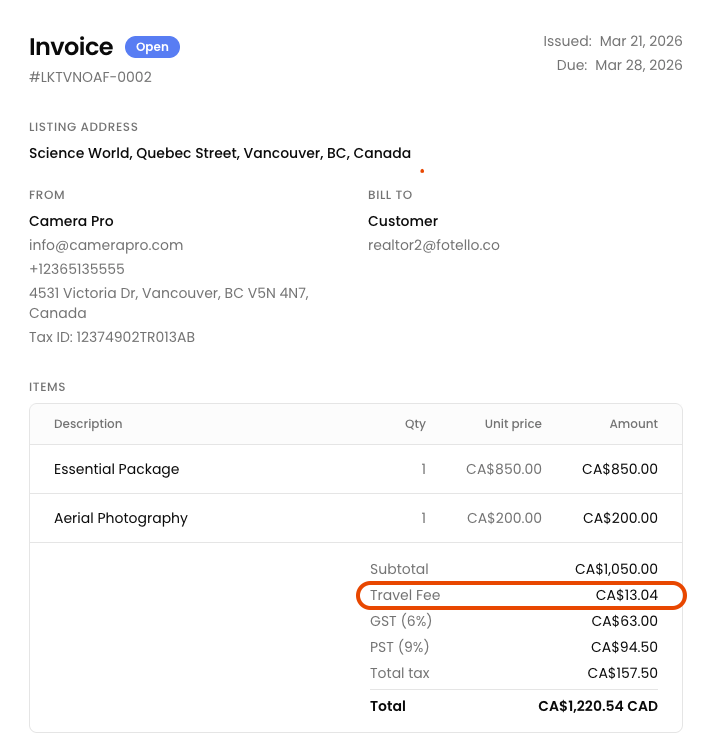
When an invoice is created, Fotello calculates the travel fee and adds it as a **Travel Fee** line item. It sits between the subtotal and taxes.
If multiple team members are assigned or there are multiple appointments on an order, travel fees are summed across all members and appointments.
Travel Fee on a customer invoice
{% hint style="info" %}
Travel fees are calculated at invoice creation, not during booking. This way the fee is based on the actual assigned team member and their home base.
{% endhint %}
### Good to know
* **Distance unit** (miles or kilometers) comes from your [business details](/business-details/branding.md). Travel fee uses the same unit.
* **Currency** follows your business currency setting.
* If a team member has **no home base** and no company address is set, no travel fee is calculated for that member.
* The appointment address comes from the listing or booking address on the order.
* Travel fee only applies when there is at least one accepted appointment with an assigned team member.
* A $0 travel fee does not show on the invoice.
---
# Agent Instructions
This documentation is published with GitBook. GitBook is the documentation platform designed so that both humans and AI agents can read, navigate, and reason over technical content effectively. Learn more at gitbook.com.
## Querying This Documentation
If you need additional information that is not directly available in this page, you can query the documentation by asking a question.
Perform an HTTP GET request on the following URL with the `ask` and `goal` query parameters:
```
GET https://uni.fotello.co/products/travel-fee.md?ask=&goal=
```
`ask` is the immediate question: it should be specific, self-contained, and written in natural language.
`goal` is what the user is ultimately trying to achieve, the reason they need the answer. Sharing it helps GitBook give you a better, more relevant answer. A goal is most helpful when it describes the outcome the user wants rather than restating the question. For example, with `ask=how do I create an API token`, a goal like `automate deployments from our CI pipeline` lets GitBook tailor the answer to that use case.
The response will contain a direct answer to the question and relevant excerpts and sources from the documentation.
Use this mechanism when the answer is not explicitly present in the current page, you need clarification or additional context, or you want to retrieve related documentation sections.